Korea Air Quality Alert Pipeline
An automated pipeline that pulls real-time air quality for all 17 regions of South Korea every hour, shows it on a dashboard, and posts an alert on X when a region gets "Bad".
- Role
- Solo: ingestion, database design, SQL transformations, orchestration, dashboard, alert bot
- Duration
- About 1 week for the first version, then ongoing improvements
- Stack
- PythonSQLAirflowDockerSupabasePostgreSQL
The problem
Air quality data in Korea is published as raw readings from hundreds of individual stations. It’s hard to see at a glance which region is bad right now.
This pipeline turns those raw readings into one clear answer per region, every hour, and warns people automatically when the air gets dangerous.
- Input: the AirKorea API (Korea Public Data Portal), hourly readings from ~638 stations (AQI, PM2.5, PM10, O3, NO2, CO, SO2)
- Output: an hourly-refreshed Looker Studio dashboard and automatic X alerts for regions graded “Bad” or worse
Results
- Runs unattended every hour: 4 tasks, ~638 rows per run, 85,000+ raw rows collected so far
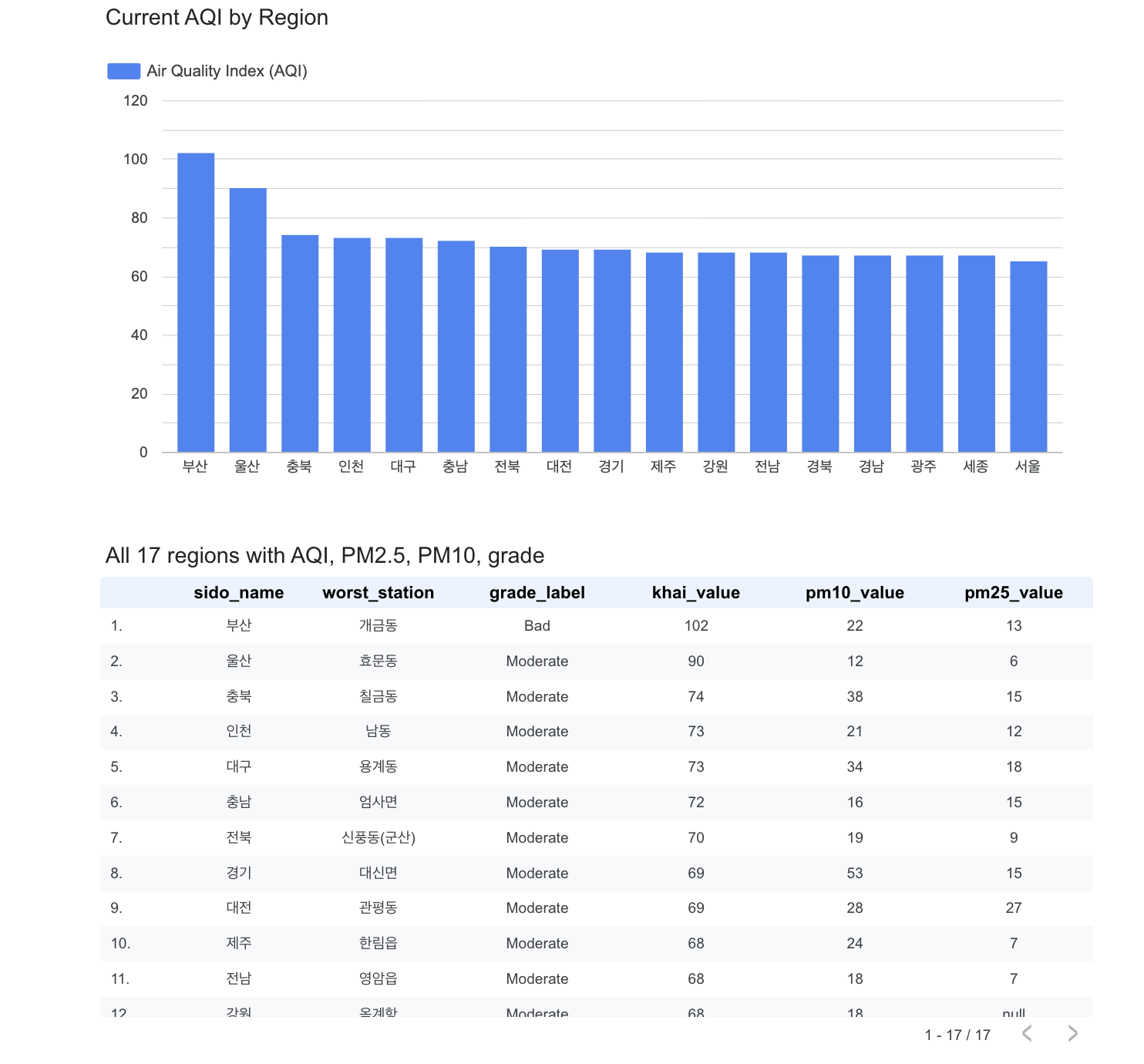
- The dashboard shows all 17 regions: current AQI, PM2.5, PM10, grade and worst station
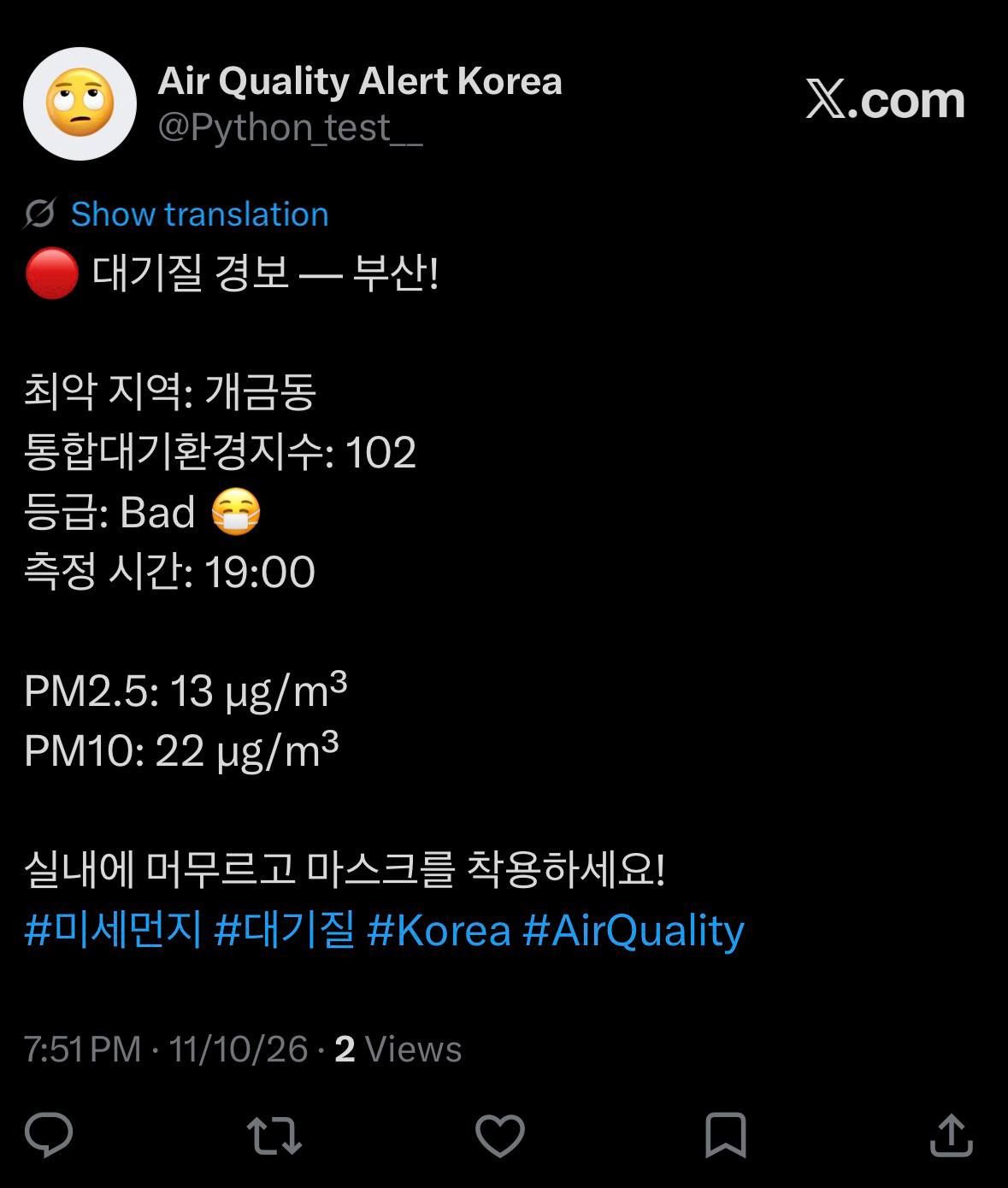
- Alerts post automatically on X. Here’s one the pipeline posted for Busan (AQI 102, “Bad”):
Architecture
Data layers (Medallion architecture)
| Layer | Table | Content |
|---|---|---|
| Bronze | bronze_air_quality |
Raw API response, appended every hour and never changed. Keeps the full history. |
| Silver | silver_air_quality |
Cleaned and typed ('-' → NULL, text → numbers and timestamps), one row per station per hour |
| Gold | gold_air_quality |
Current snapshot: one row per region (its worst station right now), a grade label and a should_tweet flag |
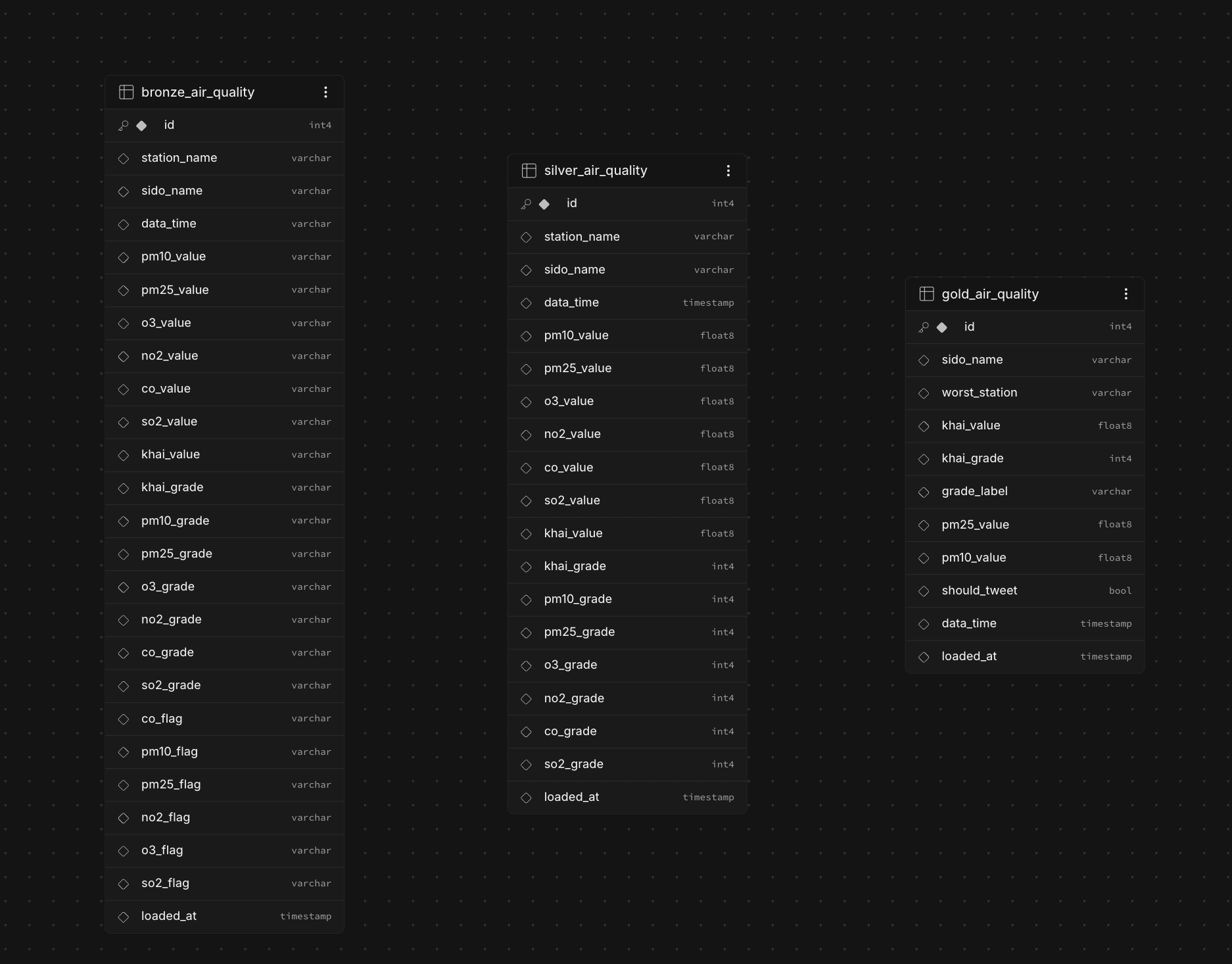
Silver and gold are rebuilt by two SQL functions, load_silver() and load_gold(), which Airflow runs right after ingestion. A fourth table, tweet_log, remembers which alerts were already posted.
Airflow DAG
Runs every hour:
fetch_insert_data → load_silver → load_gold → tweet
| Task | What it does |
|---|---|
fetch_insert_data |
Calls the AirKorea API for all 17 regions and bulk-inserts ~638 stations into bronze |
load_silver |
Runs load_silver() |
load_gold |
Runs load_gold() |
tweet |
Reads gold and posts an alert for regions where should_tweet = true |
The X alert bot
The bot posts when a region reaches grade 3 (Bad) or 4 (Very Bad), in Korean. It doesn’t spam: a region is tweeted again only after 24 hours, or sooner if its grade gets worse.
🔴 Air Quality Alert — 경기!

Worst area: 의정부읍
AQI: 173
Grade: Bad 😷
Time: 13:00

PM2.5: 35 μg/m³
PM10: 58 μg/m³

Stay indoors and wear a mask!
Problems I hit and how I fixed them
1. Gold showed old data. The dashboard still showed AQI 257 from months ago, because the gold query picked the worst station over all history. I rewrote load_gold() to use only each station’s latest reading (within 3 hours of the newest one), then pick the worst station per region.
2. Silver was 64% duplicates. The API returns the same hourly reading on every run, so silver had 85,734 rows but only 30,897 unique station-hours. load_silver() now uses DISTINCT ON (station, region, time), so silver has exactly one row per station per hour.
3. The bot repeated the same alert every hour. A region that stayed “Bad” would be tweeted 24 times a day. I added the tweet_log table: the bot only alerts if there was no alert in the last 24 hours or the grade got worse, and it logs each alert right after posting, so an Airflow retry can’t post it twice. I tested the rule with four cases.
4. Docker and Airflow use a lot of RAM. Airflow’s containers sometimes used so much memory that they crashed. This also made my AWS EC2 deployment (t3.micro, 1 GB RAM) unworkable, so it runs locally in Docker for now.
5. The pipeline failed with “Name or service not known”. The free Supabase project had been paused after inactivity. I restored it and checked that no data was lost.
6. Messy API values. Missing readings arrive as '-'. Bronze stores everything as text so nothing is lost, silver converts them to NULL, and gold ignores rows without an AQI.
Next steps
- Deploy on an always-on server with enough RAM (a larger instance or swap)
- Add a test suite and a GitHub Actions check